Highlights:
- Search Studocu's 50M+ document library by course code for instant, course-specific study materials.
- AI Notes converts 40-page readings into structured outlines in minutes.
- Study Assistant explains complex STEM concepts within the document you're already reading.
- Mock Exam and Lecture Recording turn passive study into active, exam-ready preparation.
Studocu is an AI-powered study platform trusted by over 60 million university students globally, offering a library of 50 million+ community-uploaded study documents alongside integrated AI tools, including AI Notes, Study Assistant, Mock Exam generation, and Lecture Recording. The vast majority of university students have shifted from isolated, analog study methods to technology-assisted platforms to manage academic workloads. A 2026 survey by the Higher Education Policy Institute (HEPI) found that 95% of students now use AI in some form for their studies, up sharply from 66% in 2024.
Students use Studocu to tackle four core study challenges: managing dense reading loads, decoding complex STEM concepts, building active recall before exams, and capturing lecture content without losing focus in class. Each challenge maps directly to a specific Studocu tool, making it a structured, end-to-end solution rather than a general AI assistant.
What Is the Studocu Community Library and How Does It Work?
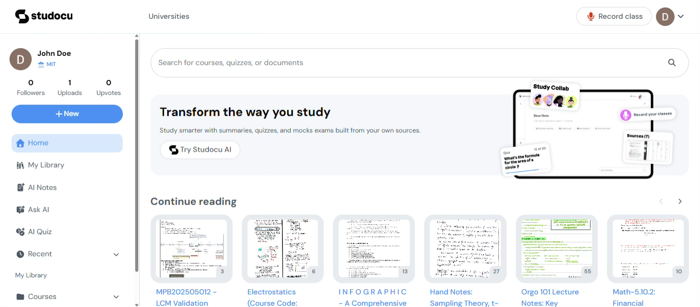
Studocu's community library contains over 50 million study documents uploaded by students from universities worldwide, organized by institution and course code. This means a student enrolling in "Introduction to Microeconomics" or "Cellular Biology" can search by their specific course code and instantly access lecture summaries, comprehensive study guides, and past practice materials created by students who have already completed the same class.
Searching by course code gives students a course-specific starting point, not generic internet definitions. Students who begin exam preparation with community-sourced materials reduce initial preparation time significantly, because the core themes, recurring exam topics, and key frameworks are already mapped out.
How Does AI Notes Help Students Manage Heavy Reading Loads?
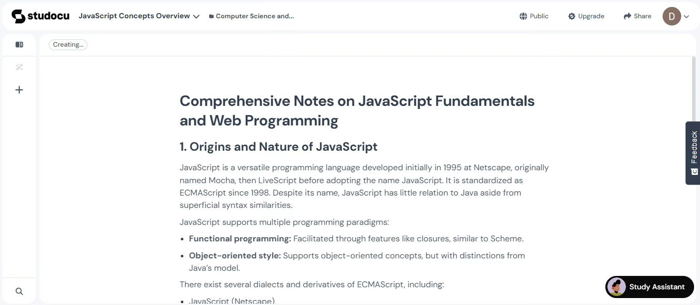
Studocu AI Notes is a summarization tool that converts lengthy PDFs and community-shared study documents into structured, bulleted outlines. When a student uploads a 40-page journal article or a semester-long reading packet, AI Notes extracts the core arguments, pivotal dates, and main conclusions, reducing a multi-hour reading task to a five-minute overview.
This is particularly useful in Humanities courses, History, Literature, and Political Science, where weekly reading assignments regularly exceed 100 pages. Students who use AI Notes to build a structured overview first, then dive into the full text for specific quotes, complete reading-heavy assignments faster without sacrificing comprehension. This matters at scale: according to a Fortune investigation published in January 2026, Gen Z college students are now assigned 25-40 pages per class session, and professors report that students "often don't know what to do" when faced with that volume.
How Does the Study Assistant Explain Complex STEM Concepts?
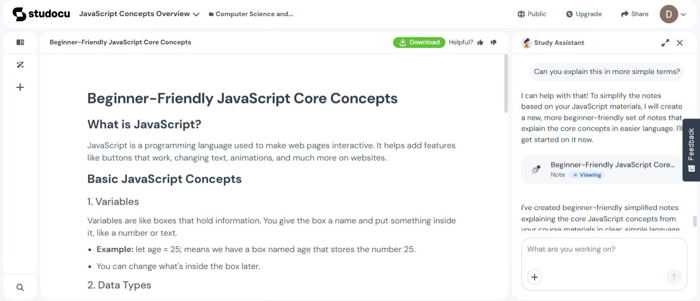
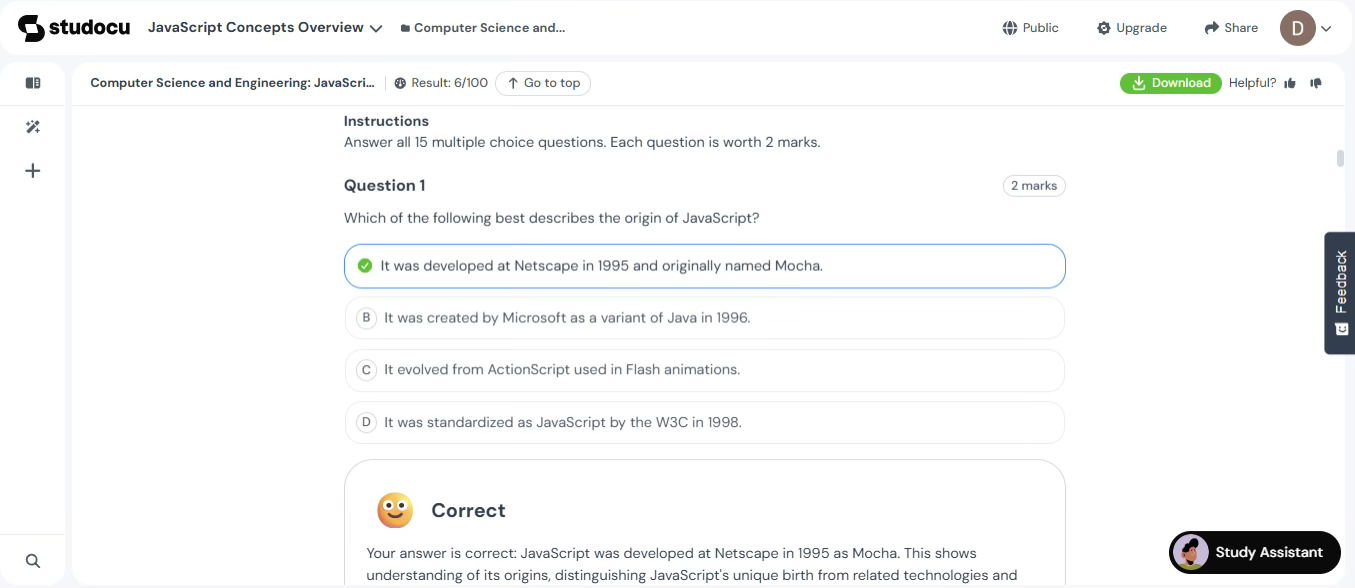
Studocu Study Assistant is an interactive AI tool embedded directly within the document viewer that provides context-grounded explanations of difficult concepts on demand. A student reviewing lecture slides on thermodynamics or neuroplasticity can highlight any confusing passage and ask the Study Assistant to explain it, without leaving the document.
Because Study Assistant is grounded in the specific document being viewed, its explanations are tailored to the course's context rather than drawing from general web knowledge. This distinction matters: generic AI tools return Wikipedia-level answers, while Study Assistant returns an explanation calibrated to the terminology, examples, and framing already present in the student's course material. A systematic review of 21 studies (2015–2025) published by Middle Georgia State University reported that AI-supported students outperformed peers by 15-35% on assessments when the tool was embedded in their coursework context.
How Does Studocu's Mock Exam Feature Support Active Recall?
Studocu's Mock Exam tool generates full-length practice exams from any study document in the library with a single click. Active recall, the process of retrieving information from memory under test conditions, is consistently more effective than passive re-reading. According to Birmingham City University, active recall "has been continuously proven to increase memory and long-term retention in multiple studies over the past 100 years."
Mock Exam eliminates the time cost of writing practice tests manually. A student uploads his course documents or selects a semester summary from the 50 million+ documents in the library, generates a timed practice exam, and receives detailed feedback that points directly to the specific section of the source document where each mistake originated. Running two to three Mock Exams before a final exam identifies knowledge gaps that passive review would miss entirely.
How Does Lecture Recording Turn Class Time Into Study Material?
Studocu's Lecture Recording feature, available on the Studocu mobile app and website, records the professor's audio during class and automatically transcribes it into structured study notes before the lecture ends. Students can also upload audio files of lectures they recorded from other sources. Students who use Lecture Recording do not need to type notes manually during class, freeing them to maintain eye contact, participate in discussions, and ask questions in real time.
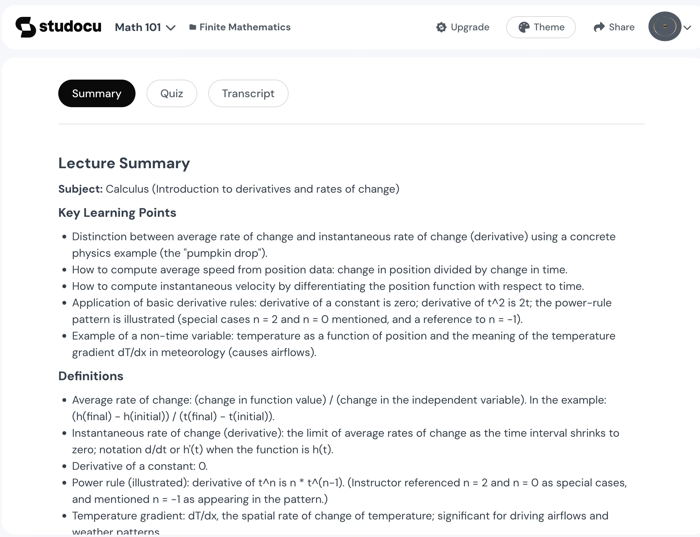
The output is not a raw transcript; it runs the transcript through Studocu's AI to produce organized, reviewable notes that are ready to study from immediately after class. This converts lecture time from a passive dictation exercise into an active learning session backed by a reliable, structured record.
Why is Studocu a smarter way to navigate university?
Studocu is a smarter way to navigate university because it provides a comprehensive ecosystem for academic success. Relying solely on sheer willpower to pass a difficult class is an outdated strategy. By combining the collective wisdom of millions of students with advanced AI Notes, the Study Assistant, and AI Mock Exams, the platform offers a targeted solution for every academic challenge.
Frequently Asked Questions (FAQs)
Q. Can I use Studocu's study tools for classes outside of my major?
A. Yes, the Studocu library covers an immense variety of subjects, from arts and humanities to advanced engineering and medical sciences.
Q. How do the Mock Exams handle visual information like charts or graphs?
A. The Studocu AI generates questions based on the textual explanations and data points surrounding visual charts within the original document.
Q. Is it possible to organize documents for different courses?
A. Yes, students can organize uploaded notes and community documents into specific folders or "Studylists" within their personal Studocu dashboard.
Q. Do I need a premium account to view community documents?
A. Studocu operates on a freemium model, where students can access basic features and AI tools for free, but unlock unlimited premium documents by purchasing a subscription or uploading high-quality study materials to earn limited free access days.
Q. Does Studocu support languages other than English?
A. Yes, Studocu's platform interface is available in 15+ languages across 30 localized versions, including Spanish, German, French, Portuguese, and Dutch. Community library documents are uploaded by students worldwide, so study materials are available in many additional languages.
Q. Does the Lecture Recording feature work for non-English lectures?
A. Yes, because Studocu serves a global community of 60 million students, its AI transcription and summarization tools support multiple major languages. This makes it an incredibly valuable asset for international students, study abroad programs, or specific foreign language courses.
Q. Can I access Studocu documents without an internet connection?
A. Yes, but offline access is a Premium feature. Premium subscribers can download and save community library documents and personal uploads directly to their devices and access offline.
Learn more about this
news